Get Started
Create an Account
In your phone, add Whatabot to your contacts list. The phone number is: +5491132704925, or you can save it scanning the following QR Code:
Send a WhatsApp message with the following text: "I allow whatabot to send me messages"
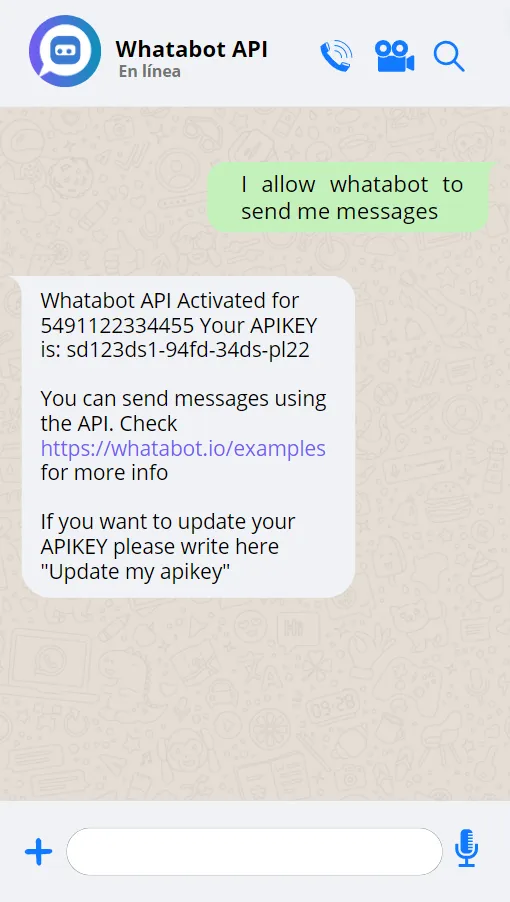
Or click here to send the message
Or scan this QR to send the message
Whatabot will answer your message and give you the API Key.
You can now start Sending and Receiving messages
You should store your API Key securely. You can change the API Key writing "Update my api key"
Examples
Learn how to use Whatabot API in practical examples

Gemini AI Chatbot with Pyhon - (similar to ChatGPT):

Send and Receive messages with Python - Realtime:

Send and Receive messages with Node.js - Realtime:

Send and Receive messages with .NET Core - Realtime:
Send messages with Python - HTTP POST:
Send messages with Node.js - HTTP POST:
Send messages with .NET Core - HTTP POST:
Send WhatsApp Photos with Python - Realtime:
Send and Receive WhatsApp messages with ESP8266 (Arduino IDE) - Realtime:
Send WhatsApp messages with ESP8266 (Arduino IDE) - HTTP POST:
Commands accepted
To send a command you have to write a message to the specified number
I allow whatabot to send me messages:
To enable your Whatabot account in order to start sending and receiving messages
To enable check your assigned API Key
Update my api key:
You must have an enabled account first
The previous API Key will be deleted. You will need to change the API Key in your projects
Delete my account:
To delete your Whatabot account
To disable all message pack subscriptions
Buy a pack:
To list all available message packs
You can buy message packs to Send or Receive messages or subscribe to our monthly plans
Remaining messages:
To show remaining messages
To show next payment (If there is an enabled subscription)
Cancel my subscription:
To cancel the active subscription
The remaining messages won't be deleted when you cancel the subscription, but if you create a new one, then the remaining messages will be reseted
Help:
To show all available commands
API REST Reference
- Whatabot for Whatsapp -
RequestSendMessage [HTTP POST] - Parameters
      Body parameters:

        ApiKey: String -> Generated by Whatabot
        Text: String -> Message to send - Max length 200 characters
        Phone: String -> Your phone - The accepted format is: Without spaces and special characters.
                        We recommend to use the one Whatabot send you when creating the account


      Details:

        URL: https://api.whatabot.io/Whatsapp/RequestSendMessage
        Method: HTTP POST
SendImage [HTTP POST] - Parameters
      Body parameters:

        ApiKey: String -> Generated by Whatabot
        Base64Image: String -> Image to send - Max size: 800Kb
        Phone: String -> Your phone - The accepted format is: Without spaces and special characters.
                        We recommend to use the one Whatabot send you when creating the account


      Details:

        URL: https://api.whatabot.io/Whatsapp/SendImage
        Method: HTTP POST
API Realtime Reference
- Whatabot for Whatsapp -
RealtimeMessages [WSS] - Parameters
      Headers:

        x-api-key: String -> Generated by Whatabot
        x-platform: String -> In this case: 'whatsapp'
        x-chat-id: String -> Your phone - The accepted format is: Without spaces and special characters.
                             We recommend to use the one Whatabot send you when creating the account


      First message:

        {"protocol":"json","version":1}
        (In order to effectively establish communication, you must send the entire text, including the special character at the end)


      Methods:

        Receive messages in the WSS [ReceiveMessage]:
          Type: 1
          Target: ReceiveMessage -> Method
          Arguments: [] -> Message text
          Example: {"type":1,"target":"ReceiveMessage","arguments":["text received"]}
            You will receive this string through the WSS when you send a Whatsapp to whatabot.io

        Sending messages through the WSS [SendMessage]:
              Type: 1
              Target: SendMessage -> Method
              Arguments: [] -> Message to send
              Example: {"type":1,"target":"SendMessage","arguments":["message to send"]}

        Receive server responses [SendMessageResponse]:
          Type: 1
          Target: SendMessageResponse -> Method
          Arguments: [] -> Server response
          Example: {"type":1,"target":"SendMessageResponse","arguments":["Message enqueued. You will receive the message in a few seconds"]}


      Details:

        URL: wss://api.whatabot.io/realtimeMessages